Fresh AI news
Astra recurrent-depth reports spark AI monitorability safety debateGoogle launches Gemini 3.8 Flash and Fairwind-only 3.8 Flash CyberMeta Muse Spark 1.3 improves agentic coding with 20% fewer tool callsMultiverse Computing launches Quasar 438B, top-scoring European AI modelAnthropic launches Claude Fable 5.1 and Mythos 5.1 for coding and researchAstra reaches Critical cyber threshold in OpenAI Path to Astra updatefal launches H3 Max post-trained video model with faster-than-real-time generationGoogle Gemini adds agentic video understanding with up to 88% fewer tokensGoogle Pics brings Nano Banana AI image editing into Workspace appsMeta Muse Voice Transcribe debuts real-time ASR and 20+ speaker diarizationWorld Labs unveils Atlas omni world model for 3D generation and simulationAnthropic hardens Claude eval sandboxes after loss-of-control incidentsAnthropic reportedly signs $35B Lambda deal for Nvidia-backed Texas AI capacityEU designates ChatGPT as Very Large Online Search Engine under the DSAAstra recurrent-depth reports spark AI monitorability safety debateGoogle launches Gemini 3.8 Flash and Fairwind-only 3.8 Flash CyberMeta Muse Spark 1.3 improves agentic coding with 20% fewer tool callsMultiverse Computing launches Quasar 438B, top-scoring European AI modelAnthropic launches Claude Fable 5.1 and Mythos 5.1 for coding and researchAstra reaches Critical cyber threshold in OpenAI Path to Astra updatefal launches H3 Max post-trained video model with faster-than-real-time generationGoogle Gemini adds agentic video understanding with up to 88% fewer tokensGoogle Pics brings Nano Banana AI image editing into Workspace appsMeta Muse Voice Transcribe debuts real-time ASR and 20+ speaker diarizationWorld Labs unveils Atlas omni world model for 3D generation and simulationAnthropic hardens Claude eval sandboxes after loss-of-control incidentsAnthropic reportedly signs $35B Lambda deal for Nvidia-backed Texas AI capacityEU designates ChatGPT as Very Large Online Search Engine under the DSA
Skip to main content

v0.4.0 now available

Coworker

AI agents for your work, running on your own computer.

  • Free download
  • macOS · Windows · Linux
  • Browser control
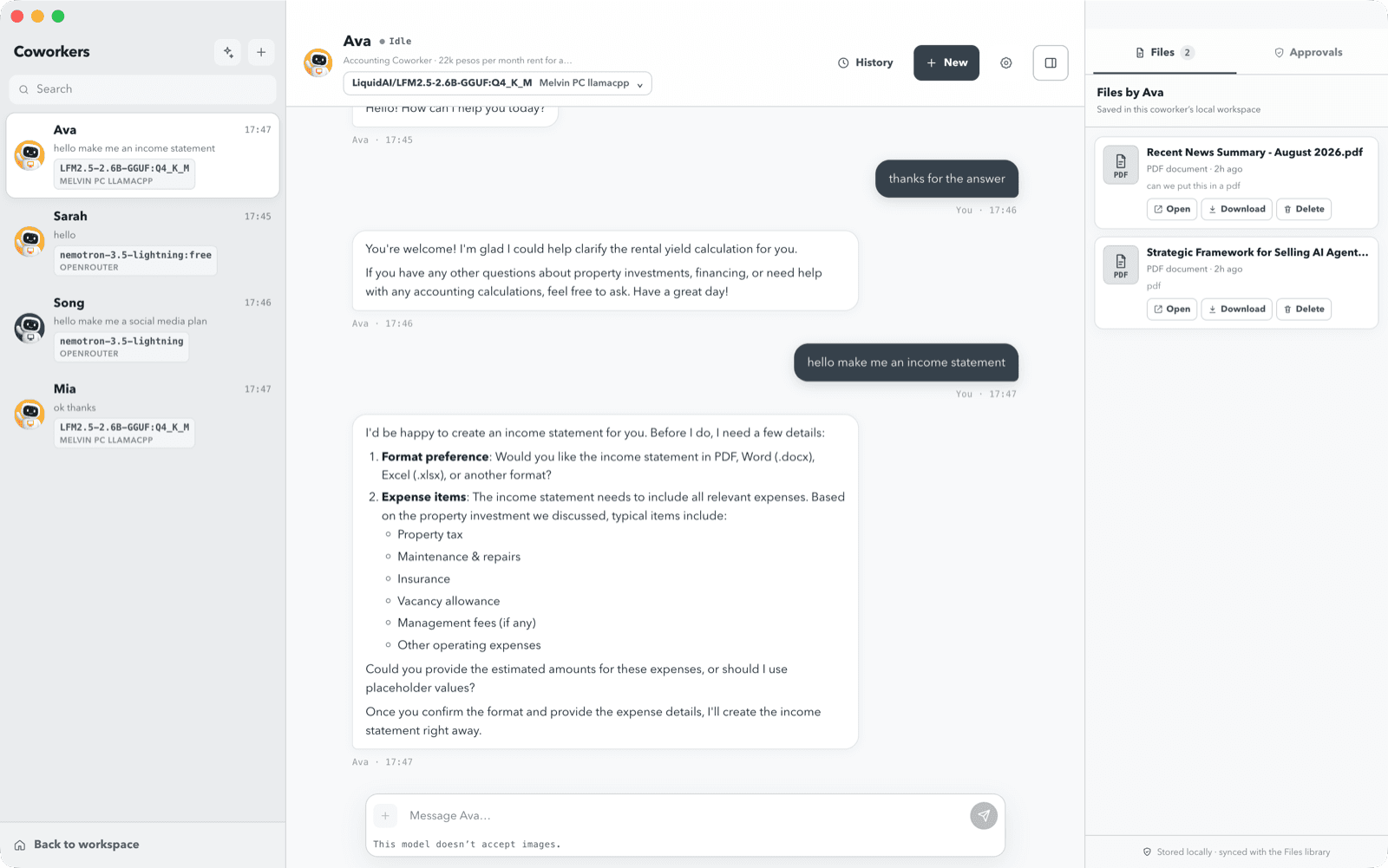
Coworker chat with an AI coworker showing the conversation, model selector, and the files it created in its workspace

New in v0.4.0

Browser control

A coworker can now operate a website for you. It drives a real, visible browser while you watch, under an approval you grant for one task at a time.

  • You see every click, and you can take over the window yourself at any point
  • The grant names the site and the goal, and it ends when that task ends
  • Passwords, payments, and one-time codes stay human-only

Browser control is off by default. Enable the browser-control skill on a coworker to give it the browser tools. Installers are larger in this release because they carry the browser the coworker drives.

Why people pick Coworker

Run it with local models

Point Coworker at Ollama or LM Studio and the model runs on your own machine. Your prompts and files never reach a model provider, and there are no API fees to pay. Cloud providers stay available when you want them.

  • Private by default with on-device inference
  • No model API bills
  • Switch models per coworker at any time

Teach it new skills

Coworkers learn new capabilities from Agent Skills. Install one by uploading a SKILL.md, adding an HTTPS URL, or pasting a skill link into chat, then enable it for the coworkers that need it.

  • Web search, document authoring, and collaboration built in
  • Turn on the browser-control skill when a coworker should drive a site
  • Add your own skills without touching the code

Works with Telegram

Pair a private Telegram chat and message a coworker from your phone. Replies mirror to the desktop, files move both ways, and approvals arrive as buttons you can tap.

  • Message a coworker from anywhere
  • Send and receive documents and photos
  • Approve or reject actions from the chat
For organizations

I customize and set up Coworker for teams.

The app is free to download and use on your own. If your organization wants coworkers shaped around real internal workflows, I take on the customization and the setup.

Coworker mascot

Not sure where a coworker fits?

Bring a task your team repeats every week and we can decide together whether Coworker is the right tool.

Coworkers built around your workflows

I configure the roles, prompts, tool policies, and approval rules your team needs, and package repeatable capabilities as skills.

Guided rollout on your machines

We install Coworker across your team and confirm every workstation runs the same reviewed setup.

Model and integration setup

Local models on your own hardware, your own provider keys, or both, plus the email, search, and Telegram connections you want.

Training and handover

A working session on delegating tasks and reviewing approvals, so the setup keeps running after I step away.

Download Coworker for your OS

Version 0.4.0 · free for macOS, Windows, and Linux.

Release notes and all downloads

After you download

  • macOS: Open the DMG and drag Coworker to /Applications. The first launch is blocked by Gatekeeper. Right-click the app and choose Open, or run xattr -dr com.apple.quarantine "/Applications/Coworker.app".
  • Windows: SmartScreen shows “Windows protected your PC” — choose More info → Run anyway.
  • Linux: Run chmod +x Coworker-*.AppImage before running it.